

How to add AdSense to WordPress
With WordPress you can easily add your AdSense code to your blog. In order to do this, first login to the administrative end of your website. Then, go to the Appearance -> Widgets menu.

In this page select to add a "Text" widget and click on the "Add" button next to it.

Then a new window with your widget will open. Click on the edit link in its right part in order to open the edit panel of the widget. You should add a title (in our case - Advertisement) and right under it the actual code that you have obtained from Google. Next, click on the "Done" button and after that on the "Save Changes" button right under it.

Well done! You have just added your AdSense code to your WordPress blog.
 Read More
Add your Comment
0
comments
Read More
Add your Comment
0
comments
Google+ Circles,Now Available in Google Voice
 A cool new feature has been added to Google Voice for users of Google+.
You can now use your Circles as custom groups in your Google Voice
account. What does that mean? Google Software Engineer Tom Ford explains
it in his blog post:
A cool new feature has been added to Google Voice for users of Google+.
You can now use your Circles as custom groups in your Google Voice
account. What does that mean? Google Software Engineer Tom Ford explains
it in his blog post:To help make it even easier for you to organize your contacts, today we’re adding Google+ Circles to Google Voice. Circles give you more control over how you manage your callers; for example, calls from your “Creepers” circle can be sent straight to Voicemail, only your “College Buddies” circle will hear you rap your voicemail greeting, or you can set your “Family” circle to only ring your mobile phone.
All you have to do is log in to your Google
Voice account and go to the Groups and Circles tab to see all your
Google+ Circles. You can then edit each one to suit your needs for that
group. Pretty simple and powerful. So do you have any Circles that need
to always go directly to voice mail? Yeah, I thought so. Me too.


 Read More
Add your Comment
0
comments
Read More
Add your Comment
0
comments
How to use the Google calculator
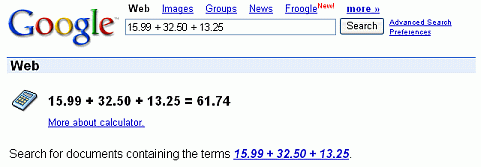 Google’s calculator tries to understand the problem you are attempting to solve without requiring you to use special syntax. However, it may be helpful to know the most direct way to pose a question to get the best results. Listed below are a few suggestions for the most common type of expressions (and a few more esoteric ones).
Most operators come between the two numbers they combine, such as the plus sign in the expression 1+1.
Operator Function Example
+ addition 3+44
- subtraction 13-5
* multiplication 7*8
/ division 12/3
^ exponentiation (raise to a power of) 8^2
% modulo (finds the remainder after division) 8%7
choose X choose Y determines the number of ways of choosing a set of Y elements from a set of X elements 18 choose 4
th root of calculates the nth root of a number 5th root of 32
% of X % of Y computes X percent of Y 20% of 150
Some operators work on only one number and should come before that number. In these cases, it often helps to put the number in parentheses.
Operator Function Example
sqrt square root sqrt(9)
sin, cos, etc. trigonometric functions (numbers are assumed to be radians) sin(pi/3)
tan(45 degrees)
ln logarithm base e ln(17)
log logarithm base 10 log(1,000)
A few operators come after the number.
Operator Function Example
! factorial 5!
Other good things to know
You can force the calculator to try and evaluate an expression by putting an equals sign (=) after it. This only works if the expression is mathematically resolvable. For example, 1-800-555-1234= will return a result, but 1/0= will not.
Parentheses can be used to enclose the parts of your expression that you want evaluated first. For example, (1+2)*3 causes the addition to happen before the multiplication.
The in operator is used to specify what units you want used to express the answer. Put the word in followed by the name of a unit at the end of your expression. This works well for unit conversions such as: 5 kilometers in miles.
You can use hexadecimal, octal and binary numbers. Prefix hexadecimal numbers with 0x, octal numbers with 0o and binary numbers with 0b. For example: 0x7f + 0b10010101.
The calculator understands many different units, as well as many physical and mathematical constants. These can be used in your expression. Many of these constants and units have both long and short names. You can use either name in most cases. For example, km and kilometer both work, as do c and the speed of light.
Feel free to experiment with the calculator as not all of its capabilities are listed here. To get you started, we’ve included a few expressions linked to their results.
1 a.u./c
56*78
1.21 GW / 88 mph
e^(i pi)+1
100 miles in kilometers
sine(30 degrees)
G*(6e24 kg)/(4000 miles)^2
0x7d3 in roman numerals
0b1100101*0b1001
More info on:
http://www.google.co.in/help/calculator.html
DON'T FORGET TO USE THE SHARE BUTTON TO HELP SHARE THIS POST TO YOUR FRIENDS AND LIKE THE POST IF IT HELPS YOU. TO GET OUR POST EACH TIME WE UPDATE JUST CLICK ON THE LINK Subscrie to princeonline blog by Email
 Read More
Add your Comment
0
comments
Read More
Add your Comment
0
comments


